Windows Live
VT Tray
VirusTotal checks from your Windows tray. Nothing is uploaded without your consent.
- 0.4 MB
- memory while idle
- 0
- uploads without consent
Overview
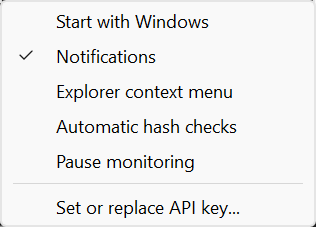
VT Tray sits in the Windows notification area and watches the folders you choose. When a new program or script appears and stops changing, it hashes the file on your PC and looks up only that fingerprint on VirusTotal, so known files never need an upload.
If VirusTotal has never seen a file, VT Tray asks before sending anything: the confirmation shows the file name, size, fingerprint and a community-sharing warning, and No is the default. The report opens in your browser when the analysis finishes.
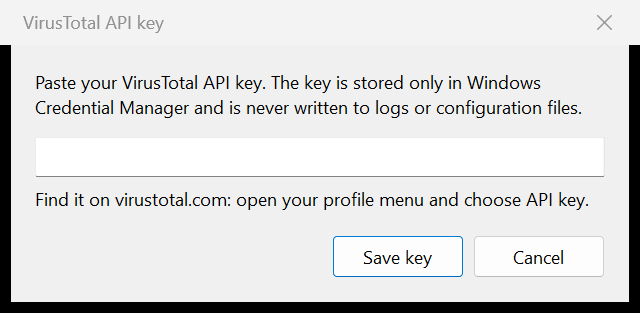
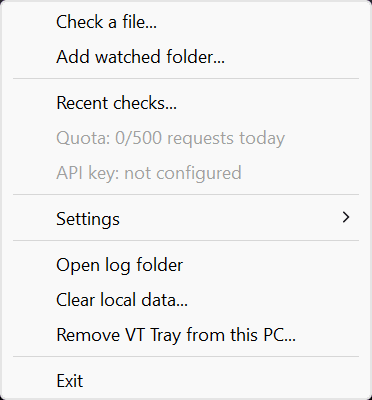
It is built in Rust on the native Win32 tray, uses about 0.4 MB of memory and no CPU while idle, and stays inside the free VirusTotal API limits with one persistent quota gate. Your API key lives in Windows Credential Manager, and uninstalling removes every entry, setting and log it created.
What it does
- 01
Hash first
Check any file from the tray or Explorer; only its SHA-256 is sent.
- 02
Consent before every upload
A per-file confirmation with a sharing warning, No by default, and the report opens when done.
- 03
Folder monitoring
New programs in watched folders are announced once; unplugged drives are picked up again when they return.
- 04
Explorer menu
Check with VT Tray never uploads; Upload with VT Tray always asks first.
- 05
Quota aware
4 requests a minute, 500 a day, 15.5K a month, with 100 a day kept for manual checks and warnings before a limit.
- 06
Private and light
No telemetry, the key stays in Credential Manager, and idle memory is checked on every build.